


How to Deactivate an Instagram Account :: In this comprehensive guide, we will walk you through the step-by-step process of deactivate an Instagram account. Whether you’re taking a break from social media or looking for a fresh start, deactivating your Instagram account can be a simple and effective solution. Our guide will provide you with detailed instructions, ensuring that you can successfully deactivate your account and take control of your online presence.
Why Deactivate Your Instagram Account?
There are various reasons why individuals choose to deactivate their Instagram accounts. Some common motivations include:
1. Privacy Concerns: Deactivating your account allows you to regain control over your personal information and photos, ensuring they are no longer accessible to the public.
2. Digital Detox: Taking a break from social media can be beneficial for mental well-being and productivity, allowing you to focus on other aspects of life.
3. Cyberbullying or Harassment: If you’ve been subjected to online abuse, deactivating your account can provide temporary relief and distance from the negativity.
4. Professional Reasons: Some professionals prefer to deactivate their personal Instagram accounts to maintain a more focused and separate online presence for their business or brand.
Important Considerations Before Deactivation
Before proceeding with the deactivation process, it’s essential to consider the following factors:
1. Backup Your Data: If you want to keep a copy of your Instagram posts, stories, or any other data, make sure to download them using the built-in Instagram data export feature.
2. Inform Your Connections: Notify your friends, followers, and contacts about your decision to deactivate your account. This will prevent confusion and ensure they understand why you’re temporarily leaving the platform.
3. Explore Alternatives: Consider using alternative social media platforms or other means of communication to stay connected with friends, family, or colleagues during your account deactivation period.

Step 1: Accessing Your Instagram Account Settings
To begin the deactivation process, follow these steps:
1. Open the Instagram app on your mobile device or access the Instagram website on your computer.
2. Log in to your Instagram account using your credentials.
Step 2: Navigating to the “Edit Profile” Section
Once you’ve logged in, navigate to the “Edit Profile” section by following these instructions:
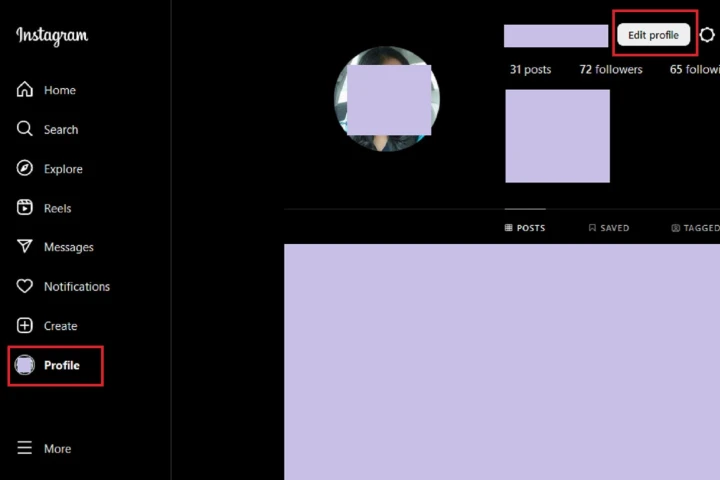
1. On the Instagram app, tap on your profile icon at the bottom right corner of the screen.
2. On the Instagram website, click on your profile picture at the top right corner of the page.
3. Select the “Edit Profile” option from the menu that appears.
Step 3: Temporarily Disabling Your Account
To temporarily disable your Instagram account, follow these steps:
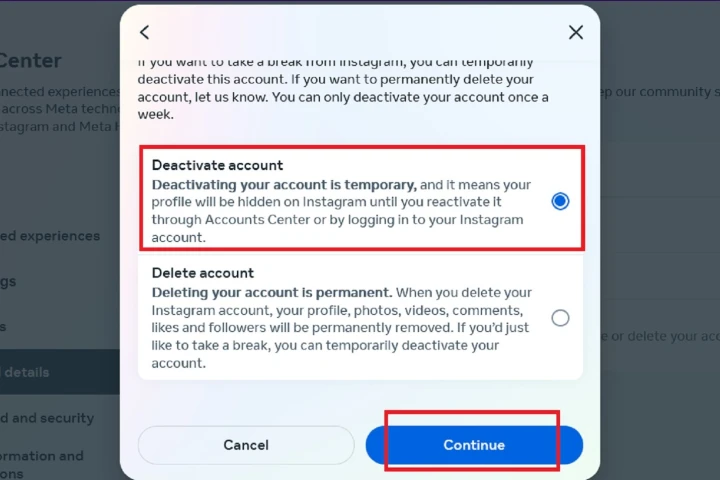
1. Scroll down to the bottom of the “Edit Profile” page.
2. Click or tap on the “Temporarily disable my account” link.
3. Select a reason for disabling your account from the drop-down menu.
4. Re-enter your account password when prompted.
5. Click or tap on the “Temporarily Disable Account” button.
Step 4: Confirming Your Decision
After completing the previous steps, Instagram will display a confirmation message. To finalize the deactivation process, do the following:
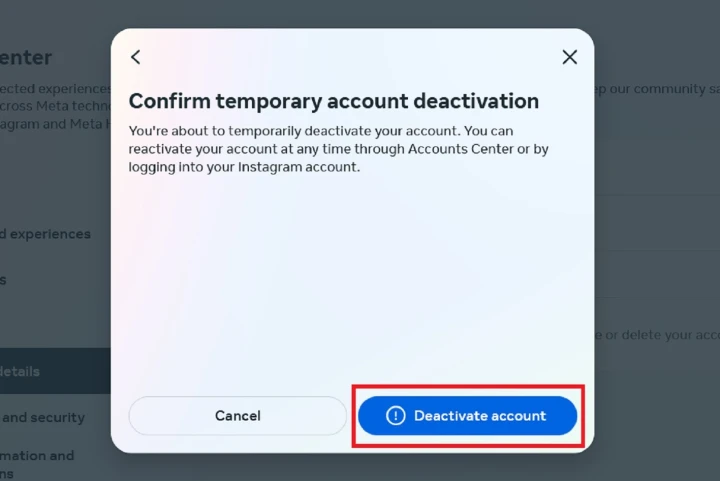
1. Read the information provided on the confirmation screen to understand the consequences of deactivation.
2. Click or tap on the “Yes” button to confirm your decision and temporarily deactivate your account.
Step 5: Reactivating Your Account
If you decide to reactivate your Instagram account, follow these steps:
1. Open the Instagram app or website.
2. Log in to your account using your credentials.
3. Your account will be reactivated, and all your data, followers, and previous posts will be restored.
Frequently Asked Questions (FAQs)
Q: Can I reactivate my Instagram account after a long period of deactivation?
Yes, you can reactivate your Instagram account at any time by simply logging in using your credentials.
Q: Will my followers be able to see my account while it’s deactivated?
No, once you deactivate your account, your profile, posts, and activities will be hidden from the public.
Q: Will my account be permanently deleted if I deactivate it?
No, deactivating your account is a temporary measure. Your account and data will be stored securely, and you can reactivate it whenever you choose to do so.
Q: Can I still use other Facebook products while my Instagram account is deactivated?
Yes, deactivating your Instagram account will not affect your access to other Facebook products or services.
Read More : How to Delete My Instagram Account: Comprehensive Guide
Conclusion
Deactivating your Instagram account can be a valuable step towards regaining control over your online presence, protecting your privacy, and taking a break from the digital world. By following our comprehensive guide, you now have the necessary knowledge to successfully deactivate your account and reactivate it when the time is right. Remember to consider your specific circumstances and reasons for deactivation before making a final decision.




