


Instagram Delete My Account :: In this comprehensive guide, we will walk you through the process of permanently deleting your Instagram account. Deleting your Instagram account is a serious decision, and we understand that you may have various reasons for doing so.
Whether you’re concerned about privacy, seeking a digital detox, or simply looking to explore other social media platforms, we’re here to help you navigate the deletion process step-by-step.
Why Delete Your Instagram Account?
Before we delve into the deletion process, let’s quickly address some common reasons why individuals choose to delete their Instagram accounts:
1. Privacy Concerns: In an era of increasing online privacy concerns, deleting your Instagram account can help safeguard your personal information and limit your digital footprint.
2. Digital Well-being: Constantly scrolling through Instagram feeds and comparing oneself to others can have a negative impact on mental health. Deleting your account may provide a much-needed break and allow you to focus on real-life experiences.
3. Time Management: Instagram can be a major time sink, often leading to decreased productivity. Deleting your account can help you regain control over your time and priorities.
Now that you understand some of the reasons why people delete their Instagram accounts, let’s move on to the step-by-step guide.

Step-by-Step Guide: How to Permanently Delete Your Instagram Account
Follow these instructions carefully to permanently delete your Instagram account:
1. Visit the Instagram Website: Open a web browser and go to the official Instagram website at www.instagram.com.
2. Log In: Enter your Instagram username and password to log in to your account.
3. Navigate to the Account Deletion Page: Once logged in, click on your profile picture in the top right corner to access your profile page. From there, click on the “Settings” icon, which resembles a gear.
4. Access the “Delete Your Account” Page: Scroll down on the Settings page and click on the “Help Center” option. In the Help Center, type “delete account” in the search bar. Select the relevant article titled “Delete Your Account” from the search results.
5. Read the Deletion Information: Carefully read the information provided on the “Delete Your Account” page. This page explains the consequences of deleting your account, such as the permanent loss of your photos, videos, and followers. Take a moment to consider if deleting your account is the right decision for you.
6. Proceed with Account Deletion: If you have decided to proceed with the deletion, click on the link provided in the first step of the “Delete Your Account” page. This link will take you to the account deletion page.
7. Choose a Reason for Deleting: On the account deletion page, you will be asked to select a reason for deleting your Instagram account from a dropdown menu. Choose the most appropriate option for your situation.
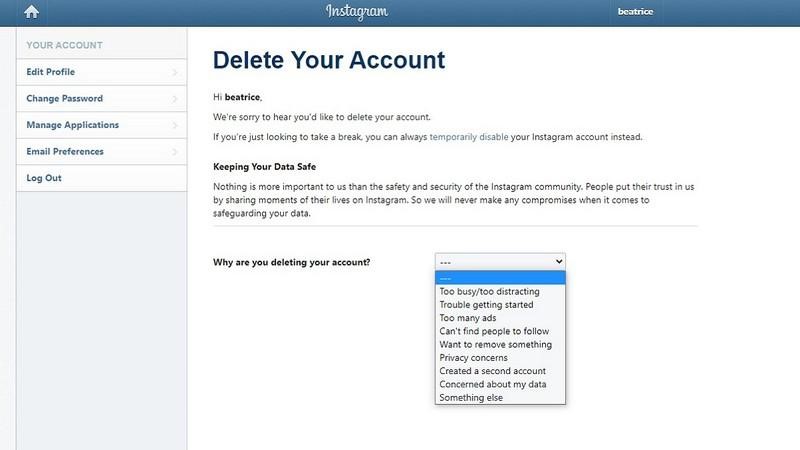
8. Re-enter Your Password: To confirm your identity and protect against unauthorized deletions, re-enter your Instagram account password.
9. Delete Your Account: After entering your password, click on the “Permanently delete my account” button. A pop-up window will appear asking for your final confirmation.
10. Final Confirmation: In the pop-up window, click on “OK” to permanently delete your Instagram account.
Congratulations! You have successfully deleted your Instagram account. Remember that this action is irreversible, and all your data will be permanently removed from Instagram’s servers.
Read More : How to Maximize Your Instagram App Success: A Comprehensive Guide
Conclusion
In this guide, we provided you with a detailed step-by-step process for permanently deleting your Instagram account. We discussed various reasons why individuals choose to delete their accounts and outlined the consequences of this action. By following the instructions outlined in this article, you can confidently delete your Instagram account and take control of your digital presence.
Remember, deleting your Instagram account is a personal decision, and it’s essential to consider the implications before proceeding. If you’re unsure about permanently deleting your account, you can also consider deactivating it temporarily as a middle ground.




