

How Instagram Account Delete :: In this comprehensive guide, we will walk you through the steps to permanently delete your Instagram account. Deleting an Instagram account can be a significant decision, and we understand that you may have various reasons for doing so.
Whether you’re looking to take a break from social media or you’ve simply decided that Instagram no longer aligns with your personal or business goals, we’re here to assist you in successfully removing your account.
Step 1: Back up Your Data
Before you proceed with deleting your Instagram account, it’s essential to back up any data you wish to save. Instagram provides options to download your account data, including photos, videos, and direct messages. To back up your data, follow these steps:
1. Log in to your Instagram account.
2. Go to your profile and click on the gear icon to access the Settings menu.
3. Scroll down to find the “Privacy and Security” section.
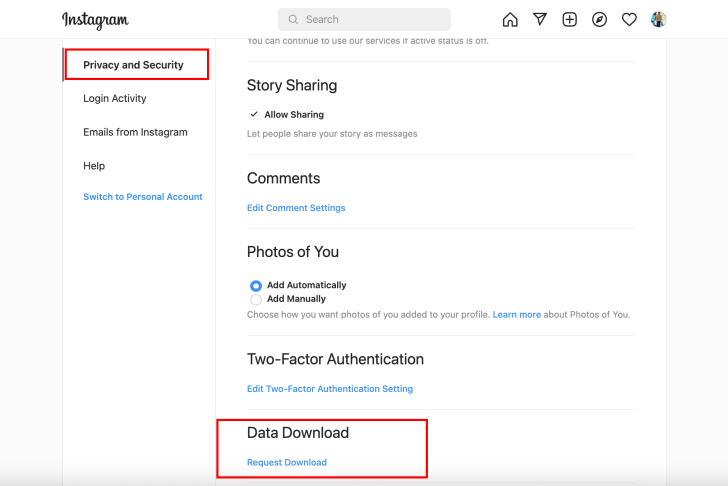
4. Under the “Data Download” category, select “Request Download.”
5. Enter your email address and click “Next.”
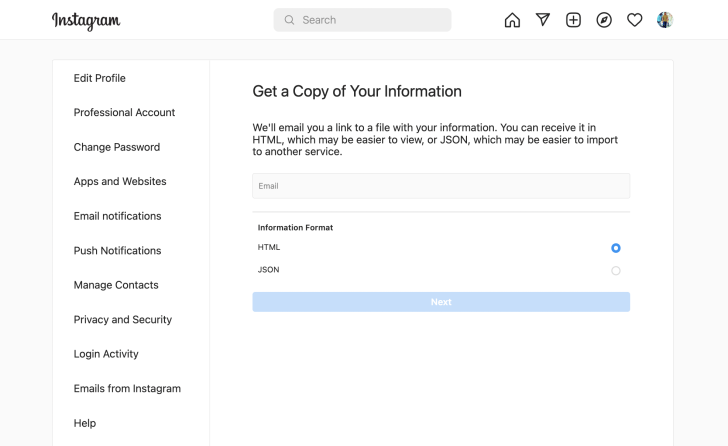
6. Enter your Instagram account password and click “Request Download.”
Once your data is ready for download, Instagram will send you an email with a link to retrieve your data. It may take some time for Instagram to compile your data, so please be patient during this process.
Step 2: Permanently Delete Your Instagram Account
Now that you’ve backed up your data, it’s time to proceed with deleting your Instagram account. Please note that once you delete your account, all your data, including photos, videos, followers, and comments, will be permanently removed and cannot be recovered. To delete your Instagram account, follow these steps:
1. Visit the official Instagram account deletion page https://www.instagram.com/accounts/remove/request/permanent
2. Select a reason for deleting your account from the provided drop-down menu.
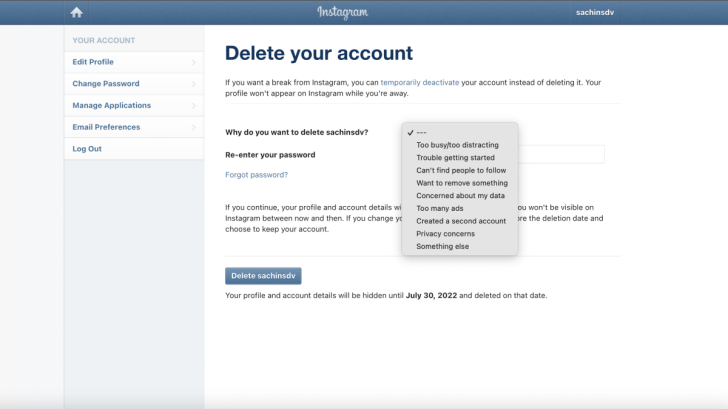
3. Re-enter your Instagram account password.
4. Click on the “Permanently delete my account” button.
Once you click the “Permanently delete my account” button, your Instagram account will be scheduled for deletion. Instagram retains your account for 30 days after the deletion request, in case you change your mind and wish to reactivate it. However, please note that reactivating your account is only possible within this 30-day period.
Step 3: Informing Your Connections
Deleting your Instagram account also means losing touch with your followers and connections. If you wish to maintain these relationships outside of Instagram, we recommend informing your connections in advance. This way, they can stay connected with you through other means, such as email, phone, or other social media platforms. You can consider posting a farewell message on your Instagram story or creating a post to inform your followers about your decision.
Step 4: Explore Alternatives
While Instagram may no longer suit your needs, there are several alternatives worth exploring if you still want to stay connected with friends, family, or your audience. Here are a few popular social media platforms that you may consider:
1. Facebook: With a large user base and extensive features, Facebook provides a platform to connect with friends, join communities, and promote your business or personal brand.
2. Twitter: Known for its real-time updates and concise messaging, Twitter allows you to share your thoughts, follow influencers, and engage in conversations.
3. LinkedIn: If you’re primarily focused on professional networking and career development, LinkedIn offers a platform to connect with industry professionals, showcase your expertise, and discover job opportunities.
4. Pinterest: If visual inspiration and creativity are your passions, Pinterest allows you to discover and share ideas on a wide range of topics, including fashion, home decor, recipes, and more.
Consider exploring these platforms to find one that aligns with your goals and preferences.
Read More : How Delete Instagram Account: The Step-by-Step Guide
Conclusion
Deleting your Instagram account is a personal decision, and we hope this guide has provided you with the necessary steps to accomplish it successfully. Remember to back up your data before deleting your account and inform your connections about your decision. Exploring alternative social media platforms can also help you stay connected and engage with others outside of Instagram’s ecosystem.




