


How Delete Instagram Account :: Welcome to our comprehensive guide on permanently deleting your Instagram account. In this article, we will walk you through the step-by-step process to help you delete your Instagram account effectively. Whether you are looking to take a break from social media or have decided to move on from Instagram altogether, we’ve got you covered.
Why Delete Your Instagram Account?
Before we dive into the deletion process, let’s briefly discuss why you might want to delete your Instagram account. While Instagram offers a platform for sharing photos, connecting with friends, and exploring exciting content, there are several reasons why individuals choose to leave the platform:
1. Privacy Concerns: With the increasing focus on data privacy, some users may prefer to limit their online presence and the information they share.
2. Time Management: Instagram can be addictive, and users may find themselves spending excessive amounts of time scrolling through their feed.
3. Frustration with Algorithmic Changes: Instagram’s algorithmic changes may lead to decreased visibility for some users, impacting their overall experience.
4. Security: If your Instagram account has been compromised or you suspect any unauthorized access, deleting your account can help protect your personal information.
Step-by-Step Guide: Deleting Your Instagram Account
To delete your Instagram account permanently, follow these simple steps:
Step 1: Backup Your Data
Before proceeding with the deletion process, it’s crucial to create a backup of your Instagram data. This ensures that you don’t lose any precious memories or valuable content. To back up your data:
1. Open the Instagram app on your device.
2. Go to your profile and tap on the menu icon (three horizontal lines).
3. Select “Settings” from the menu.
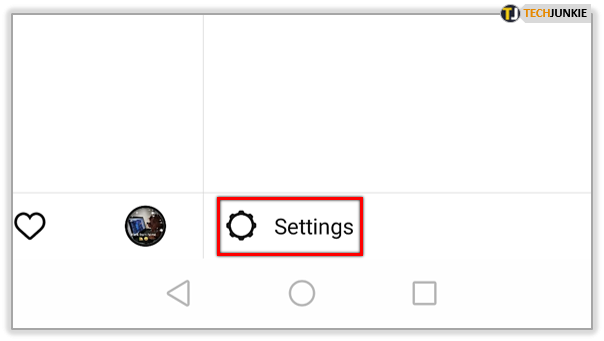
4. Tap on “Security” and then choose “Download Data.”
5. Enter your email address and tap “Request Download.”
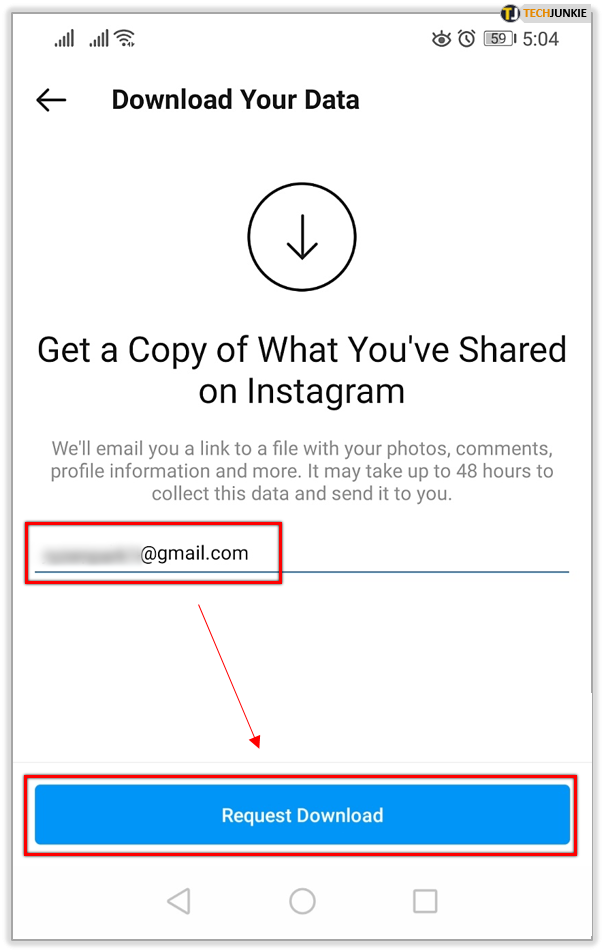
Instagram will now prepare a download link for your data, which will be sent to your email. The backup process may take some time, depending on the amount of data associated with your account.
Step 2: Accessing Instagram’s Delete Account Page
To delete your Instagram account, you’ll need to access the official Instagram website and follow these steps:
1. Open a web browser and visit the Instagram website (www.instagram.com).
2. Log in to your account using your credentials.
3. Visit the “Delete Your Account” page by clicking on the following link: Instagram Delete Account
Step 3: Selecting the Reason for Deletion
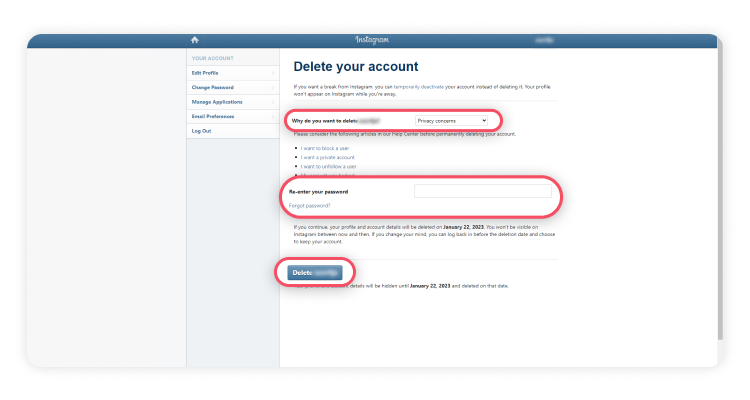
On the “Delete Your Account” page, Instagram will require you to select a reason for deleting your account. Choose the most appropriate option from the provided list.
Step 4: Deleting Your Instagram Account
Once you have selected a reason for deletion, you can proceed with permanently deleting your Instagram account. Follow these steps carefully:
1. Re-enter your Instagram account password when prompted.
2. Click on the “Permanently delete my account” button.
Step 5: Confirming Account Deletion
Instagram will display a final confirmation message before permanently deleting your account. Ensure that you have backed up all necessary data, as this process is irreversible. If you’re ready to proceed, click “OK.”
Additional Information
Account Deactivation vs. Deletion
It’s important to understand the difference between deactivating and deleting your Instagram account. Deactivation temporarily suspends your account, while deletion permanently removes it from the platform. If you ever decide to return to Instagram after deactivating your account, you can simply log in again.
Impact of Deleting Your Account
When you delete your Instagram account, the following actions occur:
1. Your profile, photos, videos, comments, and followers will be permanently removed.
2. You will no longer be able to reactivate or recover any data associated with your account.
3. Your username will become available for others to use.
Read More : How to Delete Instagram Account: A Comprehensive Guide
Conclusion
We hope this guide has provided you with the necessary information and steps to confidently delete your Instagram account. Remember to back up your data before proceeding and carefully consider the irreversible nature of the deletion process. Taking control of your online presence is essential, and if deleting your Instagram account aligns with your goals, follow the steps outlined above.
Thank you for choosing our comprehensive guide to permanently delete your Instagram account. If you have any further questions or concerns, feel free to reach out to us for assistance.




