


TikTok Downloading :: In this comprehensive guide, we will walk you through the most efficient methods to downloading TikTok videos. TikTok has become one of the most popular social media platforms, and its vast library of creative and entertaining videos has captured the attention of millions of users worldwide.
Whether you want to save a memorable video for personal enjoyment or share it with your friends, we’ve got you covered. Let’s dive into the step-by-step process of downloading TikTok videos hassle-free.
Method 1: Using TikTok’s Built-in Download Feature
TikTok recently introduced a built-in download feature, making it easier than ever to save videos within the app itself. Here’s how you can utilize this convenient option:
1. Launch the TikTok app on your smartphone.
2. Browse through your feed or search for a specific video using relevant keywords.
3. Once you’ve found the video you want to download, tap on the share icon located on the right side of the screen.
4. Among the available sharing options, select “Save Video” or “Download.”
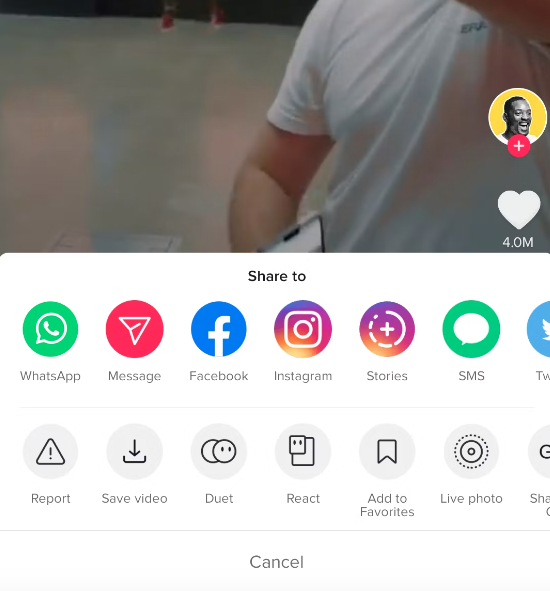
5. TikTok will now save the video directly to your device’s gallery or camera roll.
Using TikTok’s built-in download feature ensures a seamless experience, eliminating the need for third-party apps or additional steps.
Method 2: Utilizing Online Video Downloaders
If you prefer not to use TikTok’s built-in feature or if it’s unavailable on your device, you can rely on online video downloaders specifically designed for TikTok. Follow these steps:
1. Open your preferred web browser on your device.
2. Visit a reputable TikTok video downloader website SSSTikTok.
3. Return to the TikTok app and find the video you wish to download.
4. Tap on the share icon, and select the “Copy Link” option.
5. Go back to your web browser and paste the copied link into the provided field on the video downloader website.
6. Click the “Download” or “Generate Download Link” button.

7. Choose your desired video quality (if applicable) and click the download button.
8. The TikTok video will now be downloaded to your device.
Note: When using online video downloaders, be cautious and ensure you choose a reliable and trustworthy platform to protect your device and personal information.
Method 3: Screen Recording
Another alternative for downloading TikTok videos is by using screen recording software or apps. While this method may not offer the highest quality compared to direct downloads, it can be effective in certain situations. Here’s how you can do it:
1. Install a reputable screen recording app from your device’s app store.
2. Open the TikTok app and find the video you want to capture.
3. Start the screen recording app and configure the settings as desired.
4. Begin playing the TikTok video and allow the app to record your screen.
5. Once the video has finished playing, stop the screen recording.
6. Access the recorded video from your device’s gallery or the app itself.
Screen recording can be a suitable option when other methods are unavailable or if you want to capture a TikTok video that doesn’t offer a download option.
Read More : How to TikTok Watermark Remover: A Comprehensive Guide
Conclusion
In conclusion, downloading TikTok videos is a straightforward process with various methods at your disposal. Whether you prefer using TikTok’s built-in feature, online video downloaders, screen recording, or dedicated apps, each approach offers its own advantages. Select the method that suits your preferences and device compatibility. Now you can save and enjoy your favorite TikTok videos anytime, anywhere!




